Shield
Widget modes
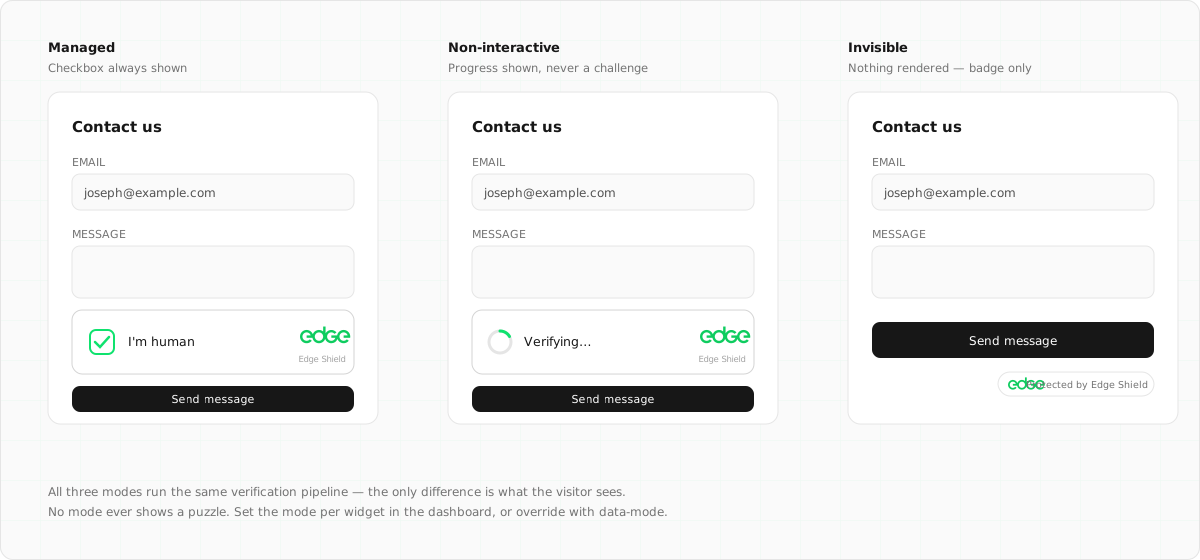
All three modes run the same verification pipeline. The only difference is what the visitor sees. No mode ever shows a puzzle.
On this page5 sections
Modes#
Managed (recommended)#
Verification is invisible for real users. If the humanity score of a background attempt is low, the widget escalates: it shows a single “I am human” confirmation, and the click triggers a harder proof-of-work challenge. Most visitors never see it.
Best for: signup, login and checkout forms, or anywhere you want maximum protection with a human fallback.
Non-interactive#
Background verification with a small status badge (“Verifying… / Verified”) so visitors can see protection is active. It never asks for input. Traffic that fails simply doesn’t receive a token.
Best for: contact forms and comment boxes where a visible trust signal is useful.
Invisible#
No visible widget at all. Verification runs on page load, or on demand via the JS API (edgeShield.execute()). Because there is no visible element, there is no interactive escalation. Low-scoring traffic fails silently.
Best for: login pages and SPAs where you want no visible widget and handle low scores server-side.
Per-widget behaviours#
Two further switches sit alongside the mode in the dashboard. They change how verification behaves, not what the visitor sees.
Shadow mode (report-only)#
Nothing is ever blocked: managed mode stops escalating, and siteverify always returns success. What strict enforcement would have decided is reported in a shadow object and counted in analytics.
Best for: trialling Shield on production traffic with zero risk of inconveniencing a real customer, then switching enforcement on once the numbers look right.
Tarpit (on by default)#
Clients that keep failing (wrong solutions, too-fast interactive answers, repeated low-score escalations) are served progressively harder proof-of-work. Each repeat offence quadruples the compute cost of the next attempt; one successful verification clears the slate immediately.
Persistent bots pay an exponentially growing electricity bill; a human who stumbles once pays a few hundred extra milliseconds. Disable it per widget if you’d rather repeat failures stay cheap.
Setting the mode#
The mode is configured per widget in the dashboard (Shield → widget → Settings) and takes effect on the next challenge issued, with no redeploy needed. You can also override it per placement with data-mode:
<!-- Set per-widget in the dashboard, or override per-placement -->
<div class="edge-shield" data-sitekey="es_..." data-mode="invisible"></div>
Data attribute reference#
| Attribute | Default | Description |
|---|---|---|
data-sitekey |
required | The widget’s public sitekey |
data-mode |
managed |
managed, non-interactive or invisible |
data-callback |
None | Global function name called with the token on success |
data-error-callback |
None | Global function name called with an error string |
data-expired-callback |
None | Called when a token expires (the widget auto-refreshes afterwards) |
data-input-name |
edge-shield-response |
Name of the hidden form input the token is written to |
data-compat |
None | Set to turnstile to also populate a cf-turnstile-response input |
Next steps
Something unclear or out of date? Tell us