Assist
Widget and embedding
The widget is a single dependency-free script. It can float as a launcher, live inline in a page, open from your own buttons or a keyboard shortcut. You can also skip integration entirely and link to the hosted page.
On this page8 sections
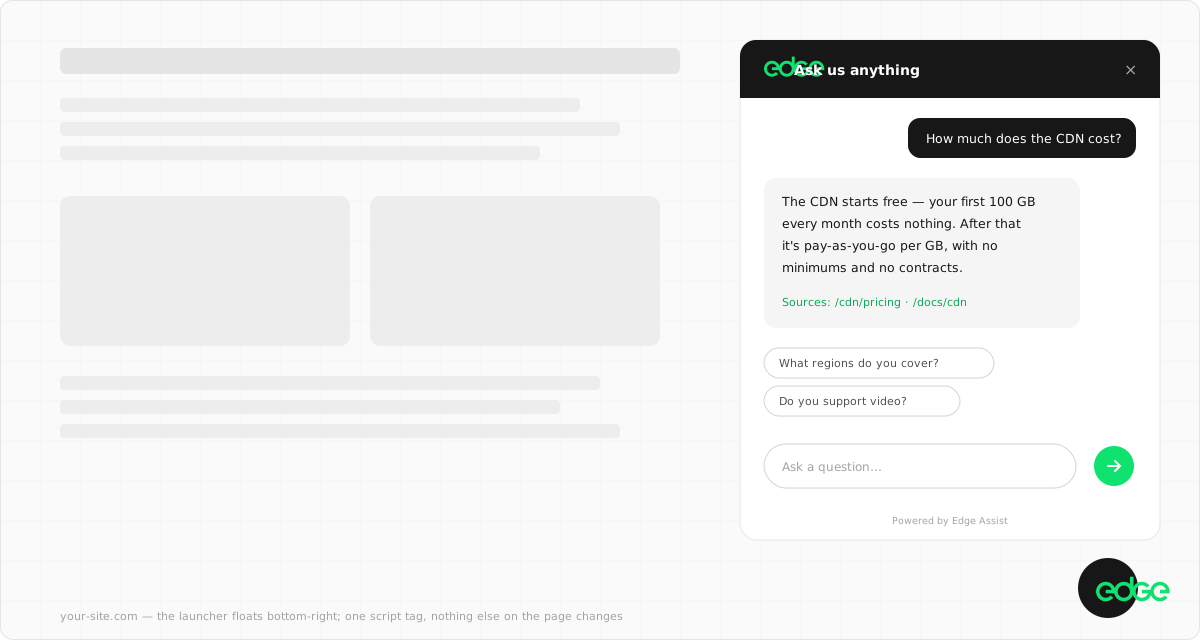
Floating launcher (default)#
<script src="https://assist.edge.network/widget.js"
  data-sitekey="ea_your_sitekey" defer></script>
With no other markup, the widget renders a launcher pill (position and label configurable in Control). Clicking it opens the assistant as a centred overlay; on mobile it fills the screen. The pill samples the page behind it and inverts to stay readable over dark sections.
Styles are isolated in a shadow root, so your CSS can’t break the widget and the widget can’t leak into your page. Typography follows your page’s font family.
Script tag options#
| Attribute | Meaning |
|---|---|
data-sitekey |
Required. Your site’s public key (ea_…). |
data-hotkey |
Optional. A single key that opens the assistant in search mode with Cmd/Ctrl, e.g. data-hotkey="k" for ⌘K. |
data-token |
Private sites only. A visitor token your server minted with a per-site API key. See Bucket ingestion. |
defer |
Recommended. The widget never blocks your page load either way. |
<script src="https://assist.edge.network/widget.js"
  data-sitekey="ea_your_sitekey" data-hotkey="k" defer></script>
Your own triggers#
Any element with data-edge-assist-open opens the assistant on click: a nav search icon, a “Chat with us” button on your contact page, a “Can’t find it? Ask” link on your 404:
<!-- Any element becomes an open trigger -->
<button data-edge-assist-open>Chat with us</button>

<!-- Open in search mode instead of chat -->
<button data-edge-assist-open="search">Search the site</button>
Or drive it from JavaScript:
// Available once widget.js has loaded
window.EdgeAssist.open()          // open in chat mode
window.EdgeAssist.open('search')  // open in search mode
window.EdgeAssist.close()
window.EdgeAssist.toggle()

// Or fire an event (no reference to the API object needed)
window.dispatchEvent(new CustomEvent('edge-assist:open'))
Inline embed#
Give the widget a mount point and the panel renders in the page flow instead of floating. Use it as a persistent ask box for help centres, docs sidebars, and support pages:
<!-- The panel renders inside this element instead of floating -->
<div data-edge-assist></div>

<!-- Fill the container completely (used by the hosted page) -->
<div data-edge-assist data-mode="page"></div>
The inline panel and the overlay are the same assistant with the same conversation state. Size the container however you like; the panel fills it.
Hosted page (zero integration)#
Every site gets a full-page assistant at https://assist.edge.network/w/<sitekey>. Link to it from an email signature, a social bio, or a support menu before you’ve touched your site’s code. The exact URL is on your site’s Overview page in Control.
Conversation behaviour#
- Conversations are stored in the visitor’s browser session and survive page navigations and close/reopen. They expire after 30 minutes idle or when the tab closes. “New conversation” ends a thread explicitly.
- Follow-ups carry context: the assistant sees the recent turns, so “why?” and “how much?” work naturally.
- Threads cap at 20 questions (100 with extended conversations). Long threads on a marketing or docs site are almost always a support case, which is what handoff is for.
- If the visitor’s question can’t be answered from your content, Assist says so and, when a handoff email is configured, offers to bring in a human.
Customisation (Control → Widget)#
Everything below is a setting, not code. Changes apply to live widgets within minutes:
| Setting | What it does |
|---|---|
| Accent colour | Brand colour for links, chips, and highlights. |
| Position | Launcher corner: bottom-right or bottom-left. |
| Welcome message & placeholder | The greeting and the input hint. |
| Suggested questions | Up to four one-click chips shown before the first question. |
| Launcher prompts | Labels the floating pill rotates through every few seconds. |
| Keep exploring links | Curated links shown alongside citations in the expanded view. |
| Handoff email | Enables “Need a human?”. Conversations are forwarded here with the transcript. |
| White label & assistant name | Paid: name the assistant after your product and remove the “Powered by Edge Assist” badge. |
| Extended conversations | Paid: longer threads with deeper memory. Deep turns meter at 2×. See Limits and billing. |
Next steps
Something unclear or out of date? Tell us