Data protection
Backups
Protect your data with VM snapshots and backups.
On this page7 sections
Overview#
Edge Network provides snapshot-based backups for your VMs. A snapshot captures the entire state of your VM’s disk at a specific point in time, allowing you to restore to that exact state if needed.
- Manual snapshots: create snapshots on demand before making changes or deployments.
- Restore any time: roll back to any saved snapshot with a single click.
Creating a snapshot#
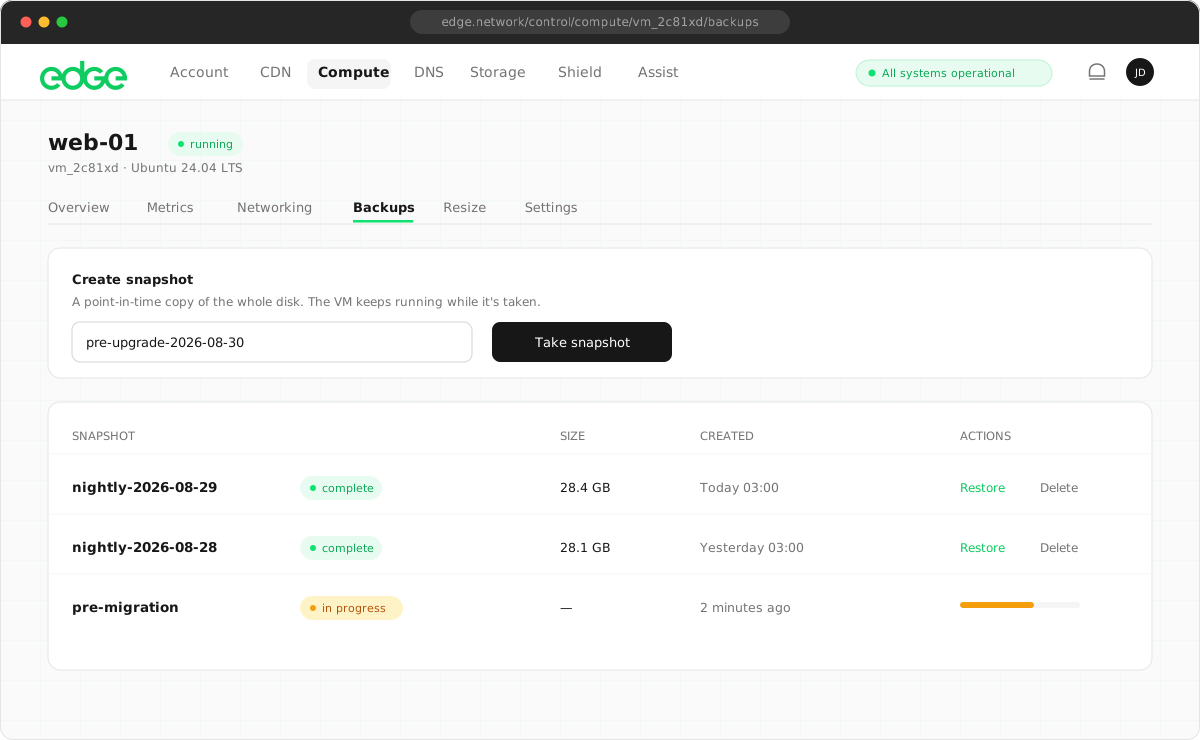
Create a snapshot to save the current state of your VM’s disk.
- Navigate to your VM’s Backups tab.
- Click Create Snapshot.
- Enter a descriptive name (e.g. “Before nginx update” or “2024-01-15”).
- Click Create.
Managing snapshots#
View and manage all snapshots for a VM from the Backups tab.
| Information | Description |
|---|---|
| Name | The name you gave the snapshot |
| Created | Date and time the snapshot was taken |
| Size | Size of the snapshot |
| Status | Ready, Creating or Error |
Restoring from a snapshot#
Roll back your VM to a previous state by restoring from a snapshot.
- Go to your VM’s Backups tab.
- Find the snapshot you want to restore.
- Click Restore.
- Confirm the restoration.
What happens during a restore#
- Your VM is stopped if it’s running.
- The disk is replaced with the snapshot contents.
- Your VM is restarted automatically.
- IP addresses and other settings remain unchanged.
Deleting snapshots#
Delete old snapshots you no longer need to free up storage.
- Go to your VM’s Backups tab.
- Find the snapshot you want to delete.
- Click the trash icon.
- Confirm the deletion.
Limits and pricing#
| Limit | Value |
|---|---|
| Snapshots per VM | 3 |
| Price | $0.05 per GB per month |
| Default retention | 7 days |
Need more snapshots or longer retention? Contact support to discuss enterprise backup options.
Best practices#
- Snapshot before major changes: always create a snapshot before updates, deployments or configuration changes.
- Use descriptive names: name snapshots with dates or descriptions so you know what state they represent.
- Combine with application-level backups: for databases, use
pg_dump,mysqldumpetc. in addition to VM snapshots. - Test your restores: periodically test restoring a snapshot to make sure your backups work when needed.
Something unclear or out of date? Tell us