Compliance & monitoring
Audit log
Comprehensive activity tracking for security, compliance, and operational visibility.
On this page7 sections
Overview#
Edge Network maintains a detailed audit trail of all activity across your account and infrastructure. Every action, from user sign-ins to configuration changes, is logged with timestamps, IP addresses and contextual details.
The audit log is essential for:
- Security investigations: Quickly identify unauthorised access attempts or suspicious activity patterns.
- Compliance audits: Demonstrate adherence to SOC 2, ISO 27001, GDPR and other frameworks.
- Change tracking: Understand who changed what and when, for troubleshooting and accountability.
- Operational visibility: Monitor team activity and infrastructure operations in real time.
What’s logged#
The audit log aggregates events from all Edge Network services into a single, unified view.
Account events#
| Event | Description |
|---|---|
| Sign in | User signed in (includes method: email, Google, GitHub) |
| Password changed | Account password was updated |
| 2FA enabled/disabled | Two-factor authentication status changed |
| Session revoked | User session was terminated |
| Profile updated | Account profile information was modified |
Team events#
| Event | Description |
|---|---|
| Member invited | Invitation sent to a new team member |
| Invite accepted | Team member accepted an invitation |
| Invite cancelled | Pending invitation was cancelled |
| Role changed | Team member’s role was updated |
| Member removed | Team member was removed from the account |
CDN events#
| Event | Description |
|---|---|
| Deployment created/deleted | CDN deployment lifecycle events |
| Domain added/removed | Domain configuration changes |
| Cache purged | Cache invalidation requests |
| Configuration updated | Caching rules or optimisation settings changed |
| SSL certificate issued | TLS certificate provisioned or renewed |
Compute events#
| Event | Description |
|---|---|
| VM created/deleted | Virtual machine lifecycle events |
| VM started/stopped/restarted | Power state changes |
| VM resized | Resource allocation changes (vCPU, RAM, storage) |
| Backup created/restored | Backup and recovery operations |
| Snapshot created/restored | Point-in-time snapshot operations |
DNS events#
| Event | Description |
|---|---|
| Zone created/deleted | DNS zone lifecycle events |
| Record added/updated/deleted | DNS record changes |
| Zone verified | Domain ownership verification completed |
| Zone synced | Records synchronised to DNS network |
Storage events#
| Event | Description |
|---|---|
| Bucket created/deleted | Storage bucket lifecycle events |
| Object uploaded | Files uploaded to a bucket |
| Object deleted | Files removed from a bucket |
| Object copied | Files copied within or between buckets |
| Folder created/deleted | Folder structure changes |
Accessing the audit log#
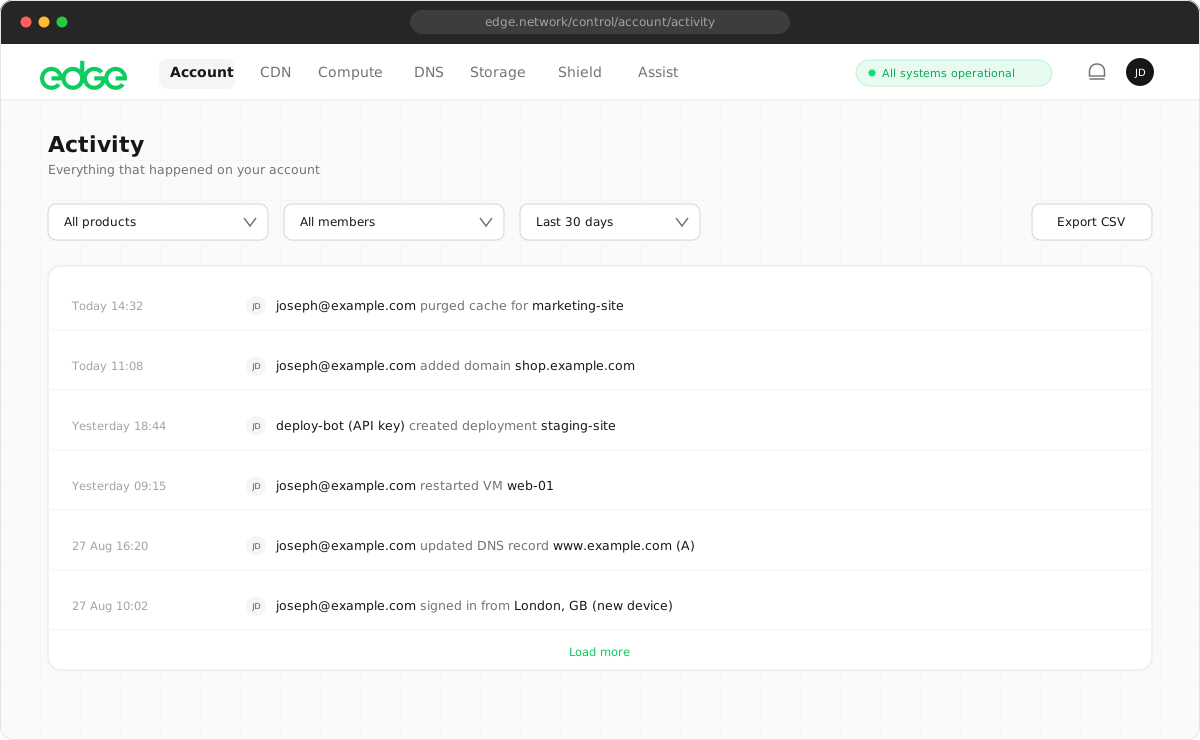
- Go to Account → Activity in your console.
- You’ll see a chronological list of all recent activity.
- Use the filters to narrow down by service (Account, CDN, Compute, DNS) or event level.
- Use the search box to find specific events by keyword.
Event details#
Each audit log entry includes:
- Timestamp: When the event occurred (UTC)
- Service: Which service the event relates to (Account, CDN, Compute, DNS, Storage)
- Event type: The specific action that was performed
- Severity level: Info, Success, Warning or Error
- Description: Human-readable summary of the event
- Actor: The team member who performed the action (for accounts with multiple members)
- Source: How the action was triggered: Web (console), CLI or API
- IP address: Source IP for user-initiated actions (where applicable)
CLI and API attribution#
Actions performed via the Edge CLI or API are automatically tagged with a CLI or API badge in the activity log. This helps teams distinguish between automated actions (scripts, CI/CD pipelines) and manual changes made through the console.
Filtering and search#
The audit log provides several ways to find the events you’re looking for.
Filter by service#
Click the service buttons (All, Account, CDN, Compute, DNS, Storage) to show only events from that service.
Filter by severity#
Use the dropdown to filter by event level: Info, Success, Warning or Error.
Keyword search#
Enter keywords in the search box to find events containing that text. This is useful for finding events related to specific resources (e.g. a VM name or domain).
Compliance and audit readiness#
Edge Network’s audit log is designed to support your compliance requirements:
- SOC 2 Type II: Comprehensive logging supports the security and availability trust principles.
- ISO 27001: Audit trails help demonstrate control effectiveness for information security management.
- GDPR: Track data access and modifications for data protection compliance.
- HIPAA: Audit logging supports access tracking requirements for healthcare workloads.
Enterprise features#
Enterprise customers have access to additional audit log capabilities.
Something unclear or out of date? Tell us