Shield
Shield Examiner
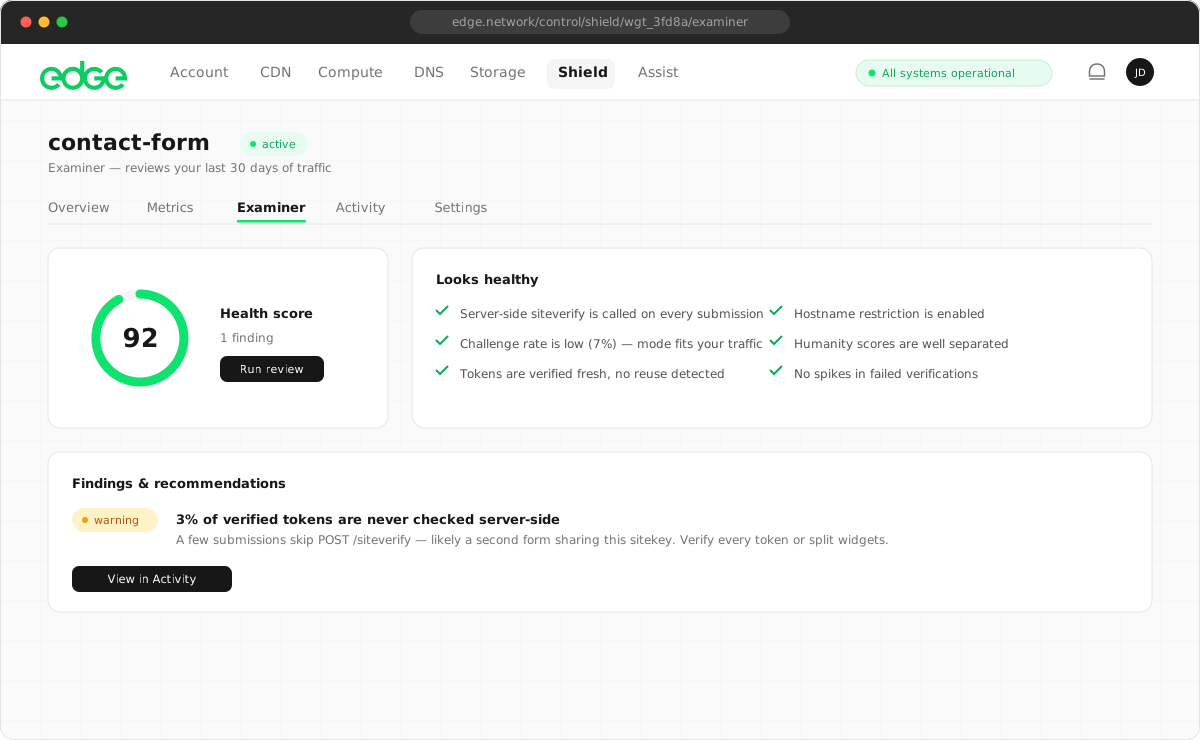
An AI review of your widget's traffic that turns 30 days of metrics into a plain-English assessment of what's healthy, what's under attack and what to tune, with specific fixes.
On this page6 sections
How to use it#
- Open a Shield widget and navigate to the Examiner tab.
- Click Run review. The analysis covers your last 30 days of traffic and takes a few seconds.
- Review the health score, findings and recommendations. Apply fixes in the widget’s Settings tab or in your own siteverify handling.
What it reviews#
- Traffic health: challenge volumes, solve rates and verification patterns, explained in terms of what they mean for your site rather than as raw numbers.
- Bot pressure: how much automation is hitting the widget, whether it’s declared (verified agents) or anonymous, and whether it’s trending up.
- Escalation calibration: whether the interactive-confirmation rate suggests genuine suspicious traffic or an over-challenged audience (VPNs, privacy browsers), and what to do about it.
- Abuse signals: token replays, verification failures, score collapses and drift-detector anomalies. These are the traces real attacks leave in aggregates.
- Configuration: whether your widget mode, verified-agents policy and hostname allowlist fit the traffic you’re actually receiving, plus recommended siteverify score thresholds.
Health score#
Each review produces a health score from 0 to 100 based on the severity and number of findings.
| Score | Rating | Meaning |
|---|---|---|
| 80–100 | Good health | Traffic looks normal; minor tuning may be suggested. |
| 50–79 | Needs attention | Calibration or bot-pressure warnings worth acting on. |
| 0–49 | Issues found | Active abuse signals or configuration problems affecting protection. |
What gets analysed#
The Examiner reviews hourly aggregate counters only (challenge volumes, solve rates, score averages and abuse counts) plus your widget’s configuration. Shield holds no per-visitor data, so none can be analysed or shared. This follows from the architecture rather than from a policy.
Saved results#
Reviews are saved automatically. When you return to the Examiner tab, your most recent result is shown with the date and time it was run. Click Run again at any time for a fresh analysis. Shield keeps your last ten.
Next steps
Something unclear or out of date? Tell us