Cache purging
Clearing the cache
Instantly invalidate cached content across all edge nodes when you need to push updates.
On this page8 sections
When to purge#
You might need to purge cached content when:
- You’ve updated content at the origin and need to push changes immediately
- You’ve deployed a new version of your site and need to clear old assets
- You’ve found an error in cached content that needs to be corrected
- You’ve removed content that should no longer be accessible
Cache size#
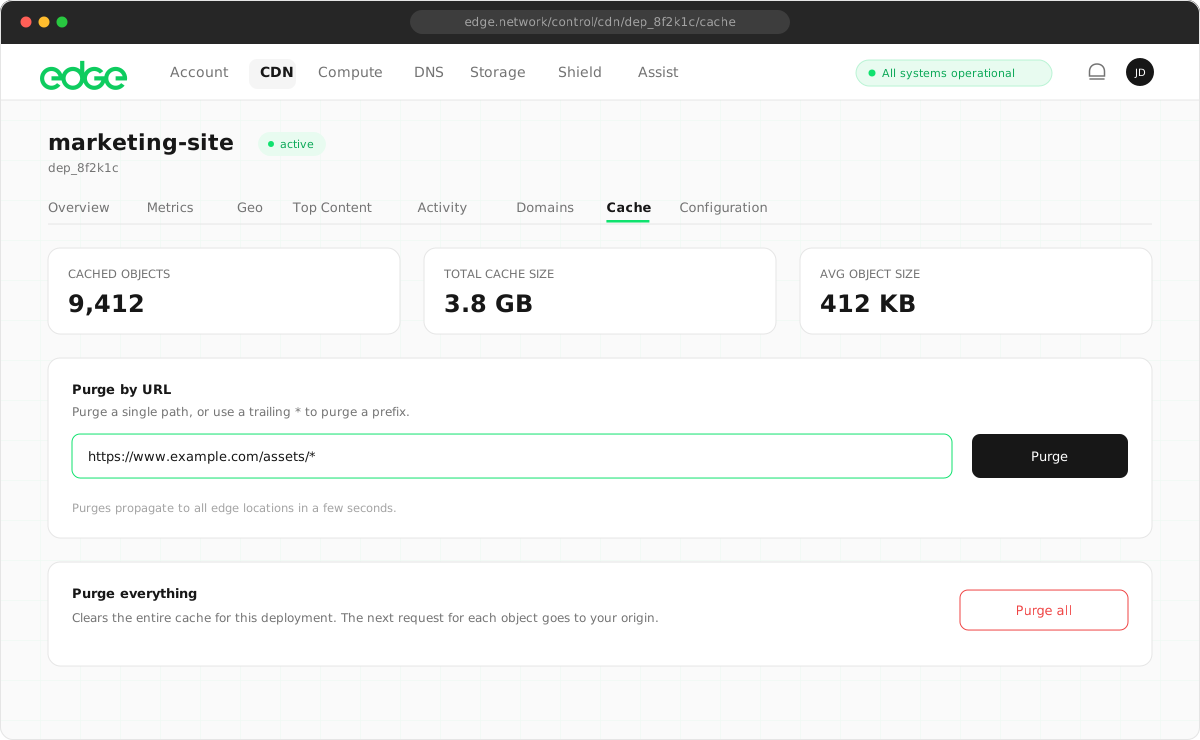
Before purging, you can view the current cache size for your deployment. The Cache Size section shows real-time statistics about what’s currently cached:
| Statistic | Example | Meaning |
|---|---|---|
| Cached Objects | 1,250 | Number of items in cache |
| Total Cache Size | 524 MB | Total bytes stored |
| Avg Object Size | 419 KB | Average size per object |
These statistics are aggregated across all domains in your deployment and update in real time. After a purge, you’ll see these numbers decrease as cached content is removed.
Purge methods#
Purge by URL#
Clear a specific file from the cache. Use this when you’ve updated individual files.
https://cdn.yoursite.com/images/hero.jpgPurge by path prefix#
Clear all files under a specific path. Useful for clearing an entire directory.
/images/*
/assets/css/*
Purge everything#
Clear the entire cache for a domain. Use sparingly, as this temporarily increases origin load.
Purging via the console#
- Navigate to your CDN deployment.
- Click the Purge Cache button.
- Select a purge method (URL, Path or Everything).
- Enter the URL or path pattern (if applicable).
- Click Purge.
Purging via the API#
Integrate cache purging into your CI/CD pipeline using the Edge API.
# Purge specific URLs
curl -X POST https://api.edge.network/v1/cdn/deployments/:id/purge \
  -H "Authorization: Bearer YOUR_API_KEY" \
  -H "Content-Type: application/json" \
  -d '{
    "urls": [
      "https://cdn.yoursite.com/images/hero.jpg",
      "https://cdn.yoursite.com/css/main.css"
    ]
  }'

# Purge by path prefix
curl -X POST https://api.edge.network/v1/cdn/deployments/:id/purge \
  -H "Authorization: Bearer YOUR_API_KEY" \
  -H "Content-Type: application/json" \
  -d '{
    "paths": ["/images/*"]
  }'

# Purge everything
curl -X POST https://api.edge.network/v1/cdn/deployments/:id/purge \
  -H "Authorization: Bearer YOUR_API_KEY" \
  -H "Content-Type: application/json" \
  -d '{
    "all": true
}'Purge speed#
- <200ms: global propagation
- 100%: edge node coverage
- Instant: effect on new requests
Best practices#
- Use versioned URLs: instead of purging, use versioned filenames (e.g.
app.v1.2.3.js) and update references. This is more reliable and allows for instant rollback. - Be specific when purging: purge specific URLs or paths rather than everything. This maintains cache efficiency and reduces origin load.
- Integrate with your deployment: add cache purging to your CI/CD pipeline so it happens automatically after deployments.
Next steps
Something unclear or out of date? Tell us