---
title: "Bot protection with Edge Shield"
description: "Protect forms, logins and signups from bots without showing humans a CAPTCHA. Add Edge Shield in two lines, validate tokens server-side, act on a 1–100 score."
url: "https://edge.network/academy/bot-protection-shield"
category: "Security"
readingTime: "3 min"
level: "beginner"
---
# Bot protection with Edge Shield
Stop form spam, credential stuffing and fake signups without ever showing a human a puzzle. Two lines on the page, one HTTP call on the server. Free forever.
## The problem with CAPTCHAs
Traditional CAPTCHAs make humans do work that AI now does better. Image puzzles cost you real conversions, while modern bots solve them for fractions of a cent. And most "invisible" alternatives pay for their invisibility with tracking.
Edge Shield takes a different approach: a lightweight proof-of-work runs in a background thread while the page loads, corroborated by server-side signals such as solve timing, header coherence, network reputation and TLS characteristics. The result is a **humanity score from 1 to 100** attached to every verification, with no cookies, no fingerprint database, and no per-visitor data stored.
The score keeps updating after that. As the visitor uses the page (typing into your form, moving the pointer), the widget summarises that interaction into a handful of aggregate statistics (computed in the browser; raw movements and keystrokes never leave the device) and refreshes its token with a behaviour-informed score. Human motor noise raises it; machine-perfect input lowers it. By the time the form is submitted, the score reflects how the visitor behaved as well as what their browser looked like.
## 1. Add the widget to your form
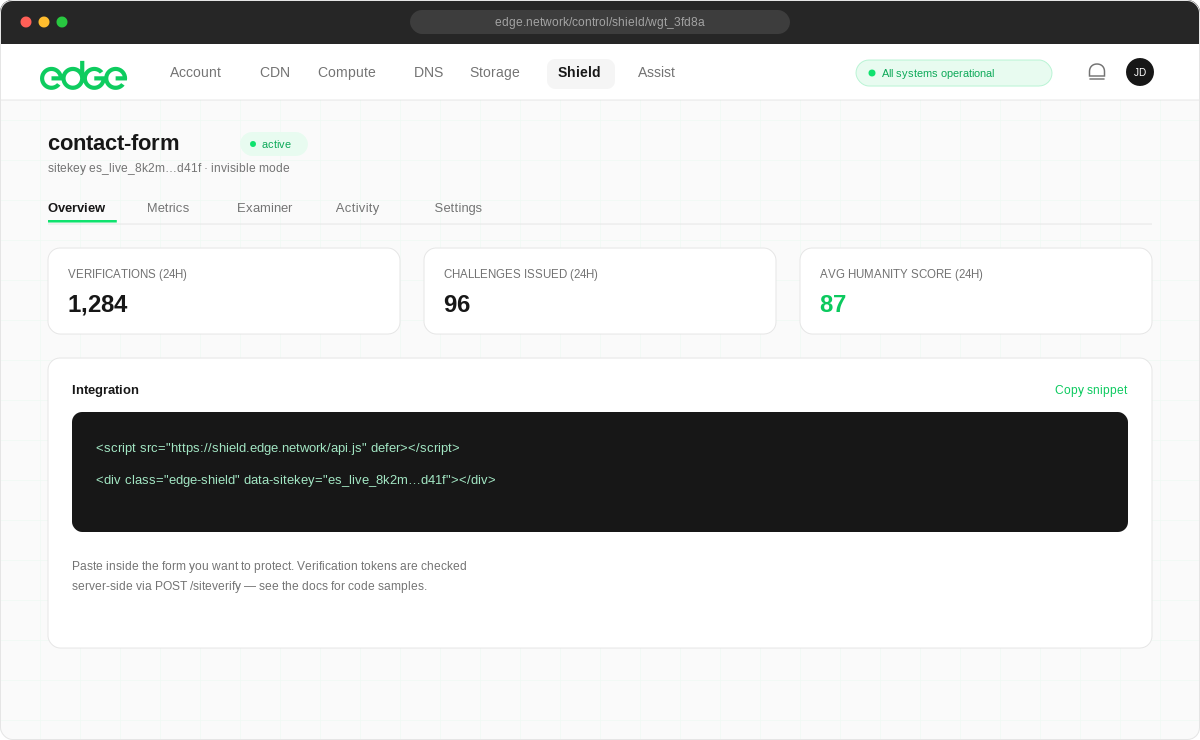
Create a widget in the [console](/console) (a verified email is all you need; no card required), then drop the script tag and a placeholder div into any form:
```html
```
Verification runs while the visitor fills in the form, and the token lands in a hidden `edge-shield-response` input automatically. In the default **managed mode**, real visitors see a small "Verified" badge; only suspicious traffic gets a single-click confirmation backed by a harder challenge.
## 2. Validate the token server-side
Client-side checks alone protect nothing. Always validate the token from your server. Tokens are single-use and expire after five minutes, so replayed or scripted submissions fail even if they captured a real token. The response shape is compatible with Cloudflare Turnstile, so migrating is a URL swap.
```js
// On your server, before processing the form
const res = await fetch('https://shield.edge.network/siteverify', {
method: 'POST',
headers: { 'Content-Type': 'application/json' },
body: JSON.stringify({
secret: process.env.SHIELD_SECRET,
response: req.body['edge-shield-response'],
}),
})
const { success, score, agent } = await res.json()
if (!success) return reject() // invalid, expired, or replayed
if (agent?.verified) return route() // declared automation: your call
if (score < 40) return stepUp() // suspicious: require confirmation
```
## 3. Act on the score
The score turns bot protection from a binary gate into a policy you control. Sensible starting bands:
| Score | Meaning | Suggested action |
|---|---|---|
| 70–100 | Confident human | Let them straight through. |
| 40–69 | Uncertain | Step up: email confirmation, or rely on managed mode’s one-click check. |
| 1–39 | Automation | Block, or route verified agents to your API instead. |
Note the third row: "automation" doesn't have to mean "blocked". AI agents acting for real customers score low, and that's accurate. If they sign their requests with [Web Bot Auth](/docs/shield/verified-agents), the siteverify response tells you exactly who they are, so you can send them to your API instead of a dead end.
## Where it earns its keep
- **Signup and login forms:** stop credential stuffing and fake account waves without adding friction for real users.
- **Contact and comment forms:** kill form spam at the source instead of moderating it afterwards.
- **Checkouts:** card-testing bots hammer payment forms. A score floor before the payment call cuts fraud and processor fees.
- **Newsletter subscriptions:** protect your sender reputation from bot-filled lists.
Every form on this site, including the newsletter box in the footer, runs Shield in invisible mode. You've been verified several times just browsing, and never noticed.
## Next steps
- [Try the live demo](/shield/demo)
- [Read the docs](/docs/shield/getting-started)